Windows
Table of Contents
1. Architecture
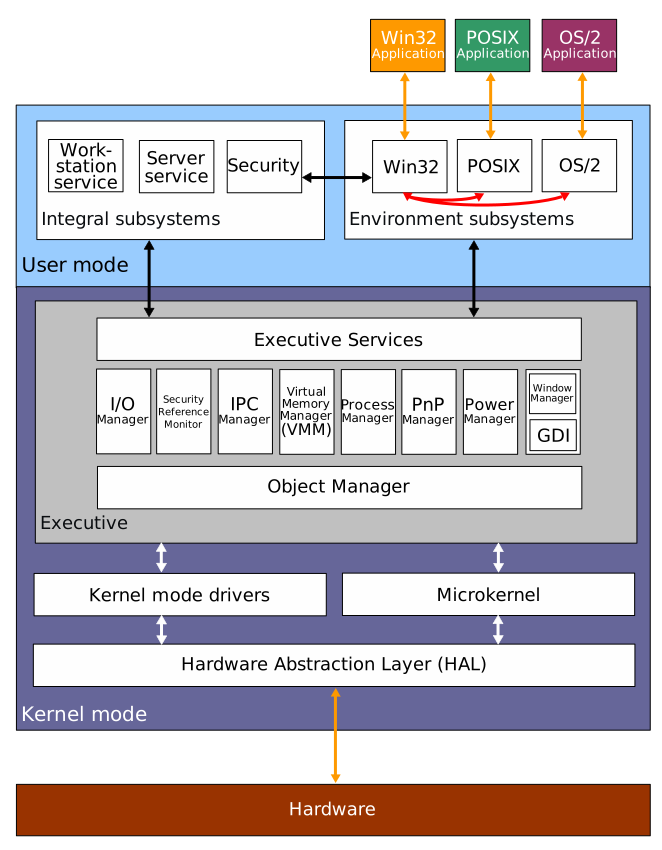
Figure 1: Windows 2000 architecture
1.1. Kernel
The kernel is called the NT kernel.
The main binary is C:\Windows\System32\ntoskrnl.exe.
.sys files are the kernel modules.
1.1.1. Kernel Debugging
Windows features kernel debugging.
Inside the debugged Windows, Run msconfig > Boot > Advanced Options > Check Debug.
On VirtualBox, enable Serial Port 1 from settings
with Host Pipe equals Port Model, and give the pipe a custom Path.
Access the pipe with WinDbg program.
1.2. Win32 API
Win32 API is actually 64-bit API but called 32 for compatibility reason. This API is required because the Windows syscall numbers are subject to change. Win32 API provide a reliable way to communicate with the kernel.
They are stored in C:\Windows\System32\
ntdll.dlla thin wrapper around the actual syscalls to NT kernel.kernel32.dllAPI that callsntdll.dll.user32.dll,gdi32.dll
1.3. C Runtime
UCRT (Universal C Runtime) ucrtbase.dll is the default
C runtime used whenever a C program is used however it was compiled.
msvcrt.dll is also there for compatibility.
C runtimes still calls Win32 APIs including ntdll.dll and kernel32.dll.
1.4. .NET Framework
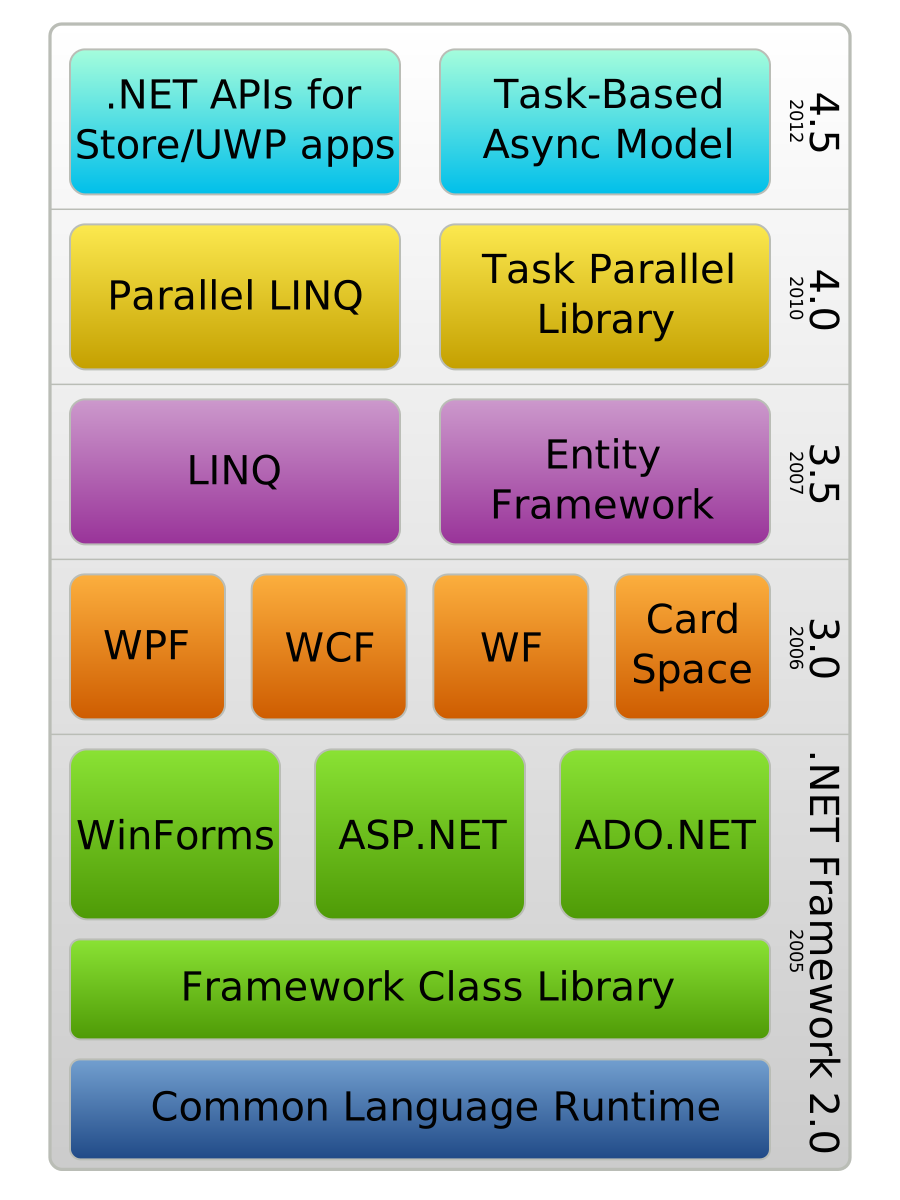
.NET is a set of libraries and frameworks that compiles source code into bytecodes called Common Intermediate Language (CIL) and run it on the Common Language Runtime (CLR) virtual machine.
C# language and .NET were developed hand in hand by Microsoft in 2000.
Later it developed into the cross-platform version of it, .NET platform which includes .NET Core
The CLR provided in clr.dll loads ucrtbase.dll, as it is written
in C++.
.NET program can use many class libraries in CIL among which core
system libraries can also contain native machine code.
System.Private.CoreLib.dll and its older version mscorlib.dll
uses machine code using InternalCall (calls compiled code in clr.dll or coreclr.dll)
or P/Invoke (calls Win32 API directly).
1.5. WinRT
- Windows Runtime
It is a standardized ABI derived from Component Object Model (COM).
Metadata files .winmd are used for each library to exposes
the available API in that library.
combase.dll is required to activate the low-level object within those library.
There are many Windows subsystem exposed in this way:
Windows.Storage.dllWindows.UI.dll
WinRT conponents rely on C runtime as they are written in C++.
2. Development
2.1. Microsoft Foundation Class Library
- MFC
- C++ library for developing desktop applications on Windows, that first introduced in 1992.
2.2. Universal Windows Platform
- UWP
Extension of WinRT that enables the applications to run on many microsoft hardwares at the same time.
2.3. Windows Presentation Foundation
- WPF
- Graphical Subsystem
Runs on .NET
2.4. Windows Form
- GUI library part
Runs on .NET
2.5. Visual Studio Build Tools
Available on the official website.
It is also part of the Visual Studio.
The build tools component includes cl.exe,
and Windows SDK includes the stdlib.h and other
libraries.
Use the development shell (preferably x64) to build a project.
3. Bootable USB
- Use any of
cat,cp,dd,tee,pvto flash.isoon the thumbdrive itself.
3.1. IRST
- In some case of intel cpu:
- Install Intel Rapid Storage Technology driver on the thumbdrive thereafter.
- Install the driver on the external drive, and install it at the install time.
3.2. Intel VMD Technology
- Volume Management Device
3.3. woeUSB
- Does the special processing required for a Windows bootable usb.
Etcher and simple cp may not be able to produce a
proper install medium, due to driver issues.
4. Configuration
4.1. regedit
4.1.1. Export and Import
Subtree of registry can be exported to .reg file,
and can be imported again by running it.
The format somewhat resembles TOML as they have section and key-value pairs.
Windows Registry Editor Version 5.00

[HKEY_LOCAL_MACHINE\SYSTEM\CurrentControlSet\Control\Keyboard Layout]
"Scancode Map"=hex:00,00,00,00,00,00,00,00,03,00,00,00,01,00,3A,00,3A,00,01,00,00,00,00,00
; binary value

[HKEY_LOCAL_MACHINE\SYSTEM\CurrentControlSet\Control\Keyboard Layout\DosKeybCodes]
"00000402"="bg"
; string value
4.1.2. Keyboard Remap
Keyboards can be remapped on scancode level.
Scancode Map under HKEY_LOCAL_MACHINE\SYSTEM\CurrentControlSet\Control\Keyboard Layout
specifies the remapping with format as follows:
00 00 00 00  // version
00 00 00 00  // flags
03 00 00 00  // # of rebinds + 1
01 00 3A 00  // bind #1: CapsLock (3A) to ESC (01)
3A 00 01 00  // bind #2: ESC (01) to CapsLock (3A)
00 00 00 00  // null terminator
The table of scancodes can be found here.
4.1.3. Antimalware Service Executable
Under HKEY_LOCAL_MACHINE\SOFTWARE\Policies\Microsoft\Windows Defender,
Set DisableAntiSpyware (DWORD 32-bit value) to 1
Windows Defender Antivirus must also be disabled alongside in the settings menu. Disable Tamper Protection under Virus & threat protection.
4.2. gpedit.msc
Group policy editor
4.3. services.mcs
Manage system services
SysMainpreloads frequently used apps into memory.
5. Programs
taskmgrtask managersysdm.cplsystem properties
5.1. Run
shell:startupshell:RecycleBinFolder
5.2. Windows App
The applications installed via Windows store are stored separately.
- System:
- User:
C:\Users\<USERNAME>\AppData\Local\Microsoft\WindowsApps\
5.3. Installer
C:\Windows\Installer is a system folder where installer files are stored.
This folder can get massive after frequent installations.
It is not recommended to remove them directly. Use dedicated tools like PatchCleaner or InstallerCleaner.
6. Shortcuts
C:\ProgramData and C:\Users\<USERNAME>\AppData folders are hidden.
%PROGRAMDATA% and %APPDATA% variable is recognized.
C:\Users\All Users\ is a link to C:\ProgramData\.
Start menu
- System:
C:\ProgramData\Microsoft\Windows\Start Menu\Programs\ - User Common:
C:\Users\Default\AppData\Roaming\Microsoft\Windows\Start Menu\Programs - User:
C:\Users\user\AppData\Roaming\Microsoft\Windows\Start Menu\Programs\
Startup app
- System:
C:\ProgramData\Microsoft\Windows\Start Menu\Programs\Startup\ - User:
C:\Users\<USERNAME>\AppData\Roaming\Microsoft\Windows\Start Menu\Programs\Startup\
Task bar
- User:
C:\Users\<USERNAME>\AppData\Roaming\Microsoft\Internet Explorer\Quick Launch\User Pinned\TaskBar\
Public Desktop
C:\Users\Public\Desktop\
7. CLI
7.1. CMD
%ENVVARNAME% to use environment variable.
7.2. PowerShell
$env:ENVVARNAME to use environment variable.
8. Compatibility
8.1. MSYS2
MSYS2 comprises of two parts: MSYS runtime enrivonment and MinGW subsystem.
MSYS runtime is where POSIX programs can run
on top of CYGWIN compatility layer.
MSYS ships a runtime library modified from cygwin1.dll called msys-2.0.dll.
MinGW (Minimalist GNU for Winodws) subsystem are the set of tools that allows POSIX source code to compile into Windows native binary that directly calls the system C runtime. There are variants to MinGW depending on which C runtime it targets:
| Subsystem | C Runtime (CRT) | Compiler | Description |
|---|---|---|---|
| UCRT64 | ucrtbase.dll |
GCC | MSYS2 default |
| MINGW64 | msvcrt.dll |
GCC | legacy runtime |
| CLANG64 | ucrtbase.dll |
Clang | |
| CLANGARM64 | ucrtbase.dll |
Clang | ARM64 (aarch64) architecture |
| MSYS | msys-2.0.dll |
GCC | Full Linux API emulation |
ucrtbase.dll and msvcrt.dll are under C:\Windows\System32\,
while msys-2.0.dll is under C:\msys64\usr\bin\ (by default).
MSYS programs are in C:\msys64\usr\bin which includes bash, pacman,
while other subsystem's programs are stored separately in C:\msys64\<subsystem>\bin.
The difference in each shells that comes with MSYS2 are
the environment variables. They are set by /etc/profile with
the main environment variable MSYSTEM controlling them.
The following changes the environment:
export MSYSTEM=UCRT64
source /etc/profile
aarch64 Windows can run amd64 programs through the Windows built-in
emulator Prism. CLANG64 and UCRT64 programs loads x8664 version of
ucrtbase.dll, and CLANGARM64 programs loads arm64 version of it.
The x8664 ucrtbase.dll also runs through Prism.
This is due to the single architecture per process policy by Windows.
Two version of ucrtbase.dll are bundled in the same file C:\Windows\System32\ucrtbase.dll
in the Arm64X format.
8.2. Windows Subsystem for Linux
- WSL
WSL1 used syscall translation directly on top of NT kernel.
WSL2 is now kernel-level virtual machine for linux. The linux kernel is running on top of Windows.